
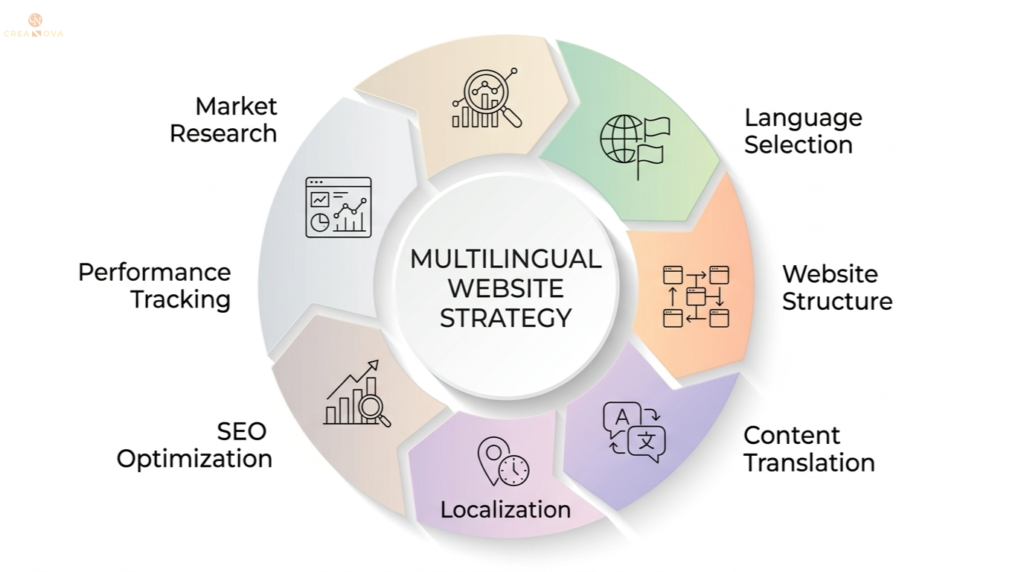
Most businesses lose 40% of their international traffic because visitors can’t understand their content in their native language. If you’re expanding globally, this language barrier could be costing you thousands of qualified leads every month. Creating a multilingual website isn’t just about translation—it’s about building a strategic digital foundation that speaks directly to each market’s cultural preferences and search behaviors. In this guide, you’ll discover the exact technical and strategic steps to build a multilingual website that converts international visitors into loyal customers. By the end, you’ll have a clear roadmap to launch your global digital presence without the common pitfalls that derail most international expansions.
Key Takeaways
- Choose between subdirectories, subdomains, or country-specific domains based on your SEO strategy and business structure.
- Professional localization goes beyond translation to adapt content for cultural preferences and local market needs.
- Implement hreflang tags correctly to help search engines understand which language version to show users.
- Use translation management systems and content delivery networks to maintain consistent user experience across all languages.
Planning Your Multilingual Strategy
Before diving into technical implementation, you need a clear strategy for your multilingual expansion. Start by researching your target markets thoroughly—understanding not just the language but the cultural nuances, local competition, and search behaviors in each region.
Identify your priority languages based on your business goals and market opportunity. Focus on 2-3 languages initially rather than trying to cover every possible market—this allows you to perfect your process and measure results effectively.
Market Research and Language Selection
Analyze your existing traffic data to identify countries where you’re already receiving visitors but potentially losing conversions due to language barriers. Google Analytics can show you which countries generate the most traffic and have the highest bounce rates, indicating potential language-related issues.
Consider the business potential of each market by researching local purchasing power, competition levels, and regulatory requirements. Some markets may have high traffic potential but complex legal requirements for international businesses.
Budget and Resource Planning
Calculate the total cost of multilingual implementation, including translation services, technical development, ongoing maintenance, and marketing for each new market. Professional translation typically costs between $0.10-$0.25 per word, while localization can cost 20-50% more than basic translation.
Plan your team structure for managing multilingual content. You’ll need native speakers for content review, customer support capabilities in each language, and technical resources for ongoing maintenance. Many businesses find success partnering with our services to handle the technical complexity while focusing on their core business operations.
Technical Setup and Website Structure
The technical foundation of your multilingual website determines both user experience and search engine performance. You have three main structural options: subdirectories (example.com/fr/), subdomains (fr.example.com), or separate domains (example.fr).
Subdirectories are typically the best choice for most businesses because they consolidate domain authority, are easier to manage, and provide clear language indicators to both users and search engines.
URL Structure Implementation
Set up your URL structure to include language indicators in a consistent format. For subdirectories, use standard language codes like /en/ for English, /es/ for Spanish, and /fr/ for French. Avoid using country codes unless you’re specifically targeting countries rather than languages.
Configure your content management system to automatically generate language-specific URLs for all pages. WordPress users can implement this with plugins like WPML or Polylang, while custom websites may require developer configuration.
Hreflang Implementation
Implement hreflang tags correctly to tell search engines which language version to serve to specific users. According to Google’s international targeting documentation, hreflang tags should be placed in the HTML head of each page or in your XML sitemap.
Each page must include hreflang tags for all language versions, including a self-referencing tag. For example, your English page should include tags pointing to the Spanish, French, and English versions of that same content.
Language Switching Functionality
Create an intuitive language switcher that’s visible on every page. Display language options using native language names (Español instead of Spanish, Français instead of French) and consider using flag icons alongside text for visual recognition.
Ensure the language switcher redirects users to the equivalent page in their selected language, not just the homepage. This maintains user context and reduces frustration when switching between languages mid-browse.
Content Translation and Localization
Professional localization goes far beyond word-for-word translation. It adapts your content for cultural preferences, local business practices, and market-specific terminology that resonates with your target audience.
Work with native speakers who understand both languages and have expertise in your industry. Machine translation tools can handle basic content, but professional review is essential for business-critical pages like product descriptions, service pages, and legal content.
Content Prioritization Strategy
Start by translating your highest-converting pages first—typically your homepage, main service pages, and key product pages. This approach allows you to start capturing international leads quickly while you work on translating supporting content.
Create a content hierarchy that identifies which pages need professional translation, which can use machine translation with human review, and which can wait for later phases. Focus your budget on pages that directly impact conversions and user trust.
Cultural Adaptation
Adapt images, colors, and cultural references for each market. What works in Western markets may not resonate in Asian markets, and vice versa. Research shows that cultural adaptation significantly impacts business success in international markets.
Consider local business practices, payment preferences, and communication styles. For example, German customers typically prefer detailed technical specifications, while American customers may respond better to benefit-focused messaging.
Legal and Compliance Content
Translate and adapt all legal content, including privacy policies, terms of service, and compliance statements for each jurisdiction. Different countries have varying legal requirements, and your multilingual site must comply with local regulations.
Ensure contact information, business hours, and support details are relevant for each market. Include local phone numbers, business addresses if applicable, and support hours in local time zones.
SEO Optimization for Multiple Languages
Each language version of your website needs independent SEO optimization. Keywords that work in English may not be the terms your international customers use when searching in their native language.
Conduct keyword research for each target language and market. Search behaviors vary significantly between countries, even when they share the same language. UK English searches differ from US English searches, and Mexican Spanish differs from Spanish.
Localized Keyword Strategy
Use native-speaking SEO specialists or tools specifically designed for international keyword research. Google Keyword Planner allows you to research keywords by country and language, giving you insight into local search volumes and competition levels.
Optimize meta titles, descriptions, and headers in each language using locally-relevant keywords rather than direct translations of your English SEO strategy. This approach often reveals new opportunities and market niches you hadn’t considered.
Technical SEO for Multilingual Sites
Create separate XML sitemaps for each language version and submit them to Google Search Console. This helps search engines discover and index your multilingual content more effectively.
Monitor crawl errors and indexing issues separately for each language. Set up Google Search Console properties for each language version to track performance and identify technical issues that may be affecting specific markets.
Local Link Building
Develop link-building strategies specific to each market. Partner with local businesses, industry publications, and influencers in each target country to build relevant backlinks to your localized content.
Create market-specific content that naturally attracts local links, such as country-specific industry reports, local case studies, or partnerships with regional organizations. These efforts support both SEO performance and market credibility.
Ongoing Management and Updates
Managing a multilingual website requires ongoing coordination to keep all language versions updated and synchronized. Develop workflows that ensure new content, product updates, and important announcements are translated and published across all languages promptly.
Implement a content management system that tracks translation status and alerts you when content updates are needed in specific languages. Consistency across languages builds trust and professionalism with international customers.
Translation Management Systems
Consider using translation management platforms like Phrase, Lokalise, or Weglot to streamline your workflow. These tools help coordinate between content creators, translators, and developers while maintaining version control across languages.
Set up approval workflows that include native speaker review before publishing translated content. This quality control step prevents cultural missteps and ensures professional presentation in all markets.
Performance Monitoring
Track conversion rates, bounce rates, and user engagement separately for each language version. This data helps you identify which markets are performing well and which may need additional optimization or marketing investment.
Monitor site speed and technical performance across different regions using tools like GTmetrix or PageSpeed Insights. Users in some countries may experience slower loading times due to server distance, requiring content delivery network optimization.
Regular performance analysis helps you understand which content resonates best in each market and informs future localization decisions. Many of our clients find that tracking these metrics through our comprehensive reporting helps them optimize their international digital marketing strategies. For detailed insights on managing international campaigns, explore our creanova.in blog for expert strategies and case studies.
Customer Support Integration
Ensure your customer support team can handle inquiries in each language you offer on your website. Nothing undermines the professional impression of a multilingual site like forcing international customers to communicate in a language they’re not comfortable with.
Set up language-specific contact forms, chatbots with multilingual capabilities, and clear escalation procedures for complex inquiries that require native speaker assistance.
Frequently Asked Questions
How much does it cost to create a multilingual website?
Costs typically range from $5,000 to $25,000 per language, depending on site complexity and content volume. This includes professional translation, technical setup, and initial SEO optimization for most business websites.
What is the difference between translation and localization?
Translation converts text from one language to another, while localization adapts content for cultural preferences, local business practices, and market-specific terminology. Localization includes currency, date formats, and cultural references.
Should I use subdirectories or separate domains for different languages?
Subdirectories (example.com/es/) are recommended for most businesses because they consolidate domain authority, are easier to manage technically, and provide clear language signals to search engines without splitting SEO value.
How do I implement hreflang tags correctly?
Add hreflang tags in the HTML head of each page, including self-referencing tags and tags for all other language versions. Each page must reference every language version of that specific content, not just the homepage.
Can I use Google Translate for my multilingual website?
Automatic translation can handle basic content but requires professional review for business-critical pages. Use machine translation for initial drafts, then have native speakers review and refine content for accuracy and cultural appropriateness.
Ready to expand your business globally with a professional multilingual website?
Grow Your Business Globally with Creanova